> ## Documentation Index
> Fetch the complete documentation index at: https://docs.quantumvoid.org/llms.txt
> Use this file to discover all available pages before exploring further.
# Bot Marketplace
> Deploy a trading bot in minutes — no code. Browse 41 ready-made presets across four strategy families.
# Bot Marketplace
The **Marketplace** tab is the full catalog of deployable bot presets — **41 preset cards across 4 strategy families and 3 exchanges** (Bybit, BloFin, DEFX). Every card is built from the exact configuration the bot will run: the numbers you see are read straight from the preset, never invented performance figures.
Deploying takes three steps: **connect a wallet → pick a preset → deploy on your own API keys**. Bots are non-custodial — they trade through your exchange API keys and your funds stay on your exchange.
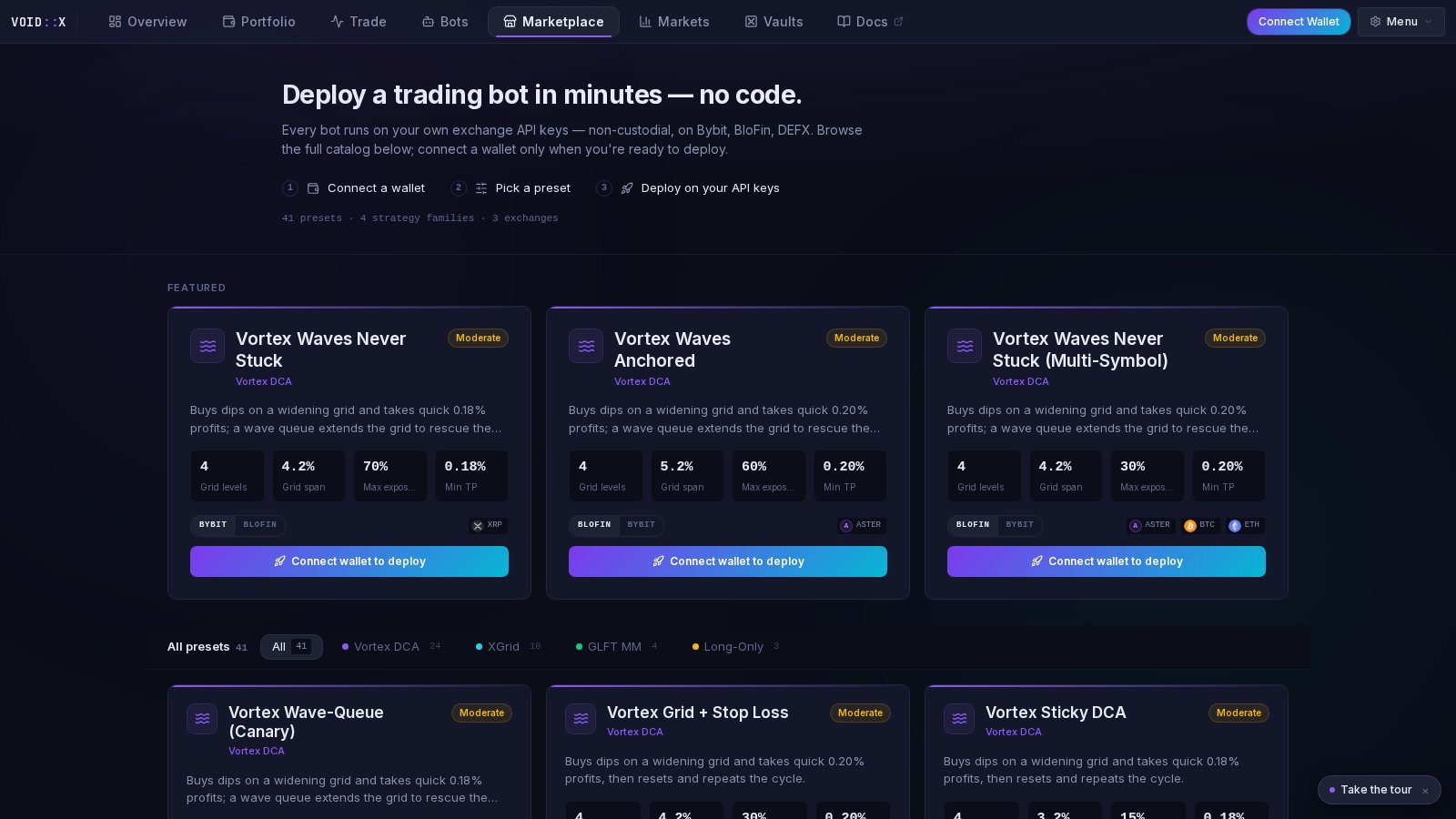 Guests can browse the entire catalog, open every detail modal, and compare presets freely. The deploy button simply reads **Connect wallet to deploy** until you connect.
***
## The Four Strategy Families
Every card carries its family's color so you can scan the catalog by strategy type:
| Family | Color | In plain English |
| ------------------- | ------ | ------------------------------------------------------------------------------------------------------------------------------------------ |
| **Vortex DCA** | Violet | Buys dips on a widening grid and takes quick small profits; wave-queue variants extend the grid to rescue positions if price keeps falling |
| **XGrid** (Perp MM) | Cyan | High-frequency grid scalper that quotes around price and follows momentum with tight take-profits |
| **GLFT MM** | Green | Quotes both sides of the order book around fair value, earning the spread while keeping inventory in check |
| **Long-Only DCA** | Amber | A long-only ladder that accumulates on the way down and sells each rung at a small profit |
A filter chip row (sticky as you scroll) narrows the grid to one family, with live counts per family.
***
## What's On a Card
Each preset card shows:
* **Name and family** — with the family icon and accent color
* **Risk pill** — Conservative (green), Moderate (amber), or Aggressive (red)
* **Plain-English one-liner** — what the bot actually does, with the real take-profit value interpolated from the config
* **Stat tiles** — three or four headline numbers read from the preset's actual configuration:
* *Vortex DCA*: grid levels, grid span, max exposure, minimum TP
* *GLFT MM*: min profit, max position, quote levels, leverage
* *XGrid*: base spread, quote levels, max position, leverage
* *Long-Only*: rung spacing, max levels, take profit
* **Exchange variant toggle** — when the same preset exists on multiple exchanges, one card carries a Bybit / BloFin toggle so you compare variants in place instead of hunting for duplicates
* **Symbol chips** — the default trading pairs with token logos
* **Deploy button** — the primary action on every card
### Featured Row
When unfiltered, the top of the catalog shows a **Featured** row — the first suggested presets from the registry, rendered as larger cards. These are good starting points if you don't know where to begin.
### Detail Modal
Click anywhere on a card (other than the buttons) to open the detail modal:
* The same headline stats and plain-English blurb
* **Technical details** — the preset's full technical description
* **Key parameters** — a grid of every scalar setting in the strategy's configuration, so you can audit exactly what will be deployed
* The exchange variant toggle and a deploy button
Use the detail modal to compare two presets honestly — the Key parameters grid is the actual config, not marketing copy.
***
## Deploying a Preset
Your wallet is your identity on the platform. Connecting and signing moves no funds.
Add encrypted API keys for the exchange the preset targets via the Add Exchange flow.
Only enable **Read** and **Trade** permissions. Never enable **Withdraw**.
Choose your exchange variant on the card if there is a toggle, then hit **Deploy**. The deploy wizard opens **prefilled with the preset's configuration**.
Adjust symbols or settings if you like, or accept the defaults. Confirm, and the bot starts trading. It now appears in the [Bots](/features/bot-management) tab.
***
## Choosing a Preset
* **Match the risk pill to your tolerance.** Conservative presets size smaller and quote wider; Aggressive presets commit more exposure for faster cycling.
* **Check max exposure / max position first.** It is the single most important number on the card — it bounds how much of your account the bot can commit.
* **Mind the minimum take-profit.** Very tight TPs (fractions of a percent) cycle fast but depend on fee tier and spread; wider TPs are slower but more forgiving.
* **Use the exchange toggle.** The same strategy is often tuned differently per exchange (fees, tick sizes, liquidity) — compare the stat tiles between variants before deploying.
* **Start with Featured or with [Vaults](/features/vaults).** Vaults are the curated 14-pick shortlist drawn from the same machinery; the Marketplace is the complete 41-preset catalog.
***
## Frequently Asked Questions
Directly from each preset's configuration file — the same registry the deploy wizard uses. Grid levels, spans, exposure, take-profit, spreads, and leverage are the literal values the bot will run with. The Marketplace shows no performance projections or invented metrics.
Variants are the same strategy tuned for different exchanges — merged onto one card with a toggle. Genuinely different presets (e.g. Conservative vs. Aggressive, single vs. multi-symbol) stay as separate cards.
Yes. The deploy wizard lets you adjust settings before launch, and after deployment the bot's full configuration is editable from the Bots tab via the Settings gear.
No. Connect a wallet, save read/trade-only API keys for a supported exchange, and make sure the exchange futures wallet holds enough balance for the preset's order sizes.
***
## Related Documentation
* **[Bot Management](/features/bot-management)** — control your deployed bots
* **[Vaults](/features/vaults)** — the curated one-click shortlist
* **[Strategy Docs](/strategies/vortex-dca)** — how each algorithm works in depth
* **[Bot Configuration Guide](/bot-configuration)** — parameter reference
Guests can browse the entire catalog, open every detail modal, and compare presets freely. The deploy button simply reads **Connect wallet to deploy** until you connect.
***
## The Four Strategy Families
Every card carries its family's color so you can scan the catalog by strategy type:
| Family | Color | In plain English |
| ------------------- | ------ | ------------------------------------------------------------------------------------------------------------------------------------------ |
| **Vortex DCA** | Violet | Buys dips on a widening grid and takes quick small profits; wave-queue variants extend the grid to rescue positions if price keeps falling |
| **XGrid** (Perp MM) | Cyan | High-frequency grid scalper that quotes around price and follows momentum with tight take-profits |
| **GLFT MM** | Green | Quotes both sides of the order book around fair value, earning the spread while keeping inventory in check |
| **Long-Only DCA** | Amber | A long-only ladder that accumulates on the way down and sells each rung at a small profit |
A filter chip row (sticky as you scroll) narrows the grid to one family, with live counts per family.
***
## What's On a Card
Each preset card shows:
* **Name and family** — with the family icon and accent color
* **Risk pill** — Conservative (green), Moderate (amber), or Aggressive (red)
* **Plain-English one-liner** — what the bot actually does, with the real take-profit value interpolated from the config
* **Stat tiles** — three or four headline numbers read from the preset's actual configuration:
* *Vortex DCA*: grid levels, grid span, max exposure, minimum TP
* *GLFT MM*: min profit, max position, quote levels, leverage
* *XGrid*: base spread, quote levels, max position, leverage
* *Long-Only*: rung spacing, max levels, take profit
* **Exchange variant toggle** — when the same preset exists on multiple exchanges, one card carries a Bybit / BloFin toggle so you compare variants in place instead of hunting for duplicates
* **Symbol chips** — the default trading pairs with token logos
* **Deploy button** — the primary action on every card
### Featured Row
When unfiltered, the top of the catalog shows a **Featured** row — the first suggested presets from the registry, rendered as larger cards. These are good starting points if you don't know where to begin.
### Detail Modal
Click anywhere on a card (other than the buttons) to open the detail modal:
* The same headline stats and plain-English blurb
* **Technical details** — the preset's full technical description
* **Key parameters** — a grid of every scalar setting in the strategy's configuration, so you can audit exactly what will be deployed
* The exchange variant toggle and a deploy button
Use the detail modal to compare two presets honestly — the Key parameters grid is the actual config, not marketing copy.
***
## Deploying a Preset
Your wallet is your identity on the platform. Connecting and signing moves no funds.
Add encrypted API keys for the exchange the preset targets via the Add Exchange flow.
Only enable **Read** and **Trade** permissions. Never enable **Withdraw**.
Choose your exchange variant on the card if there is a toggle, then hit **Deploy**. The deploy wizard opens **prefilled with the preset's configuration**.
Adjust symbols or settings if you like, or accept the defaults. Confirm, and the bot starts trading. It now appears in the [Bots](/features/bot-management) tab.
***
## Choosing a Preset
* **Match the risk pill to your tolerance.** Conservative presets size smaller and quote wider; Aggressive presets commit more exposure for faster cycling.
* **Check max exposure / max position first.** It is the single most important number on the card — it bounds how much of your account the bot can commit.
* **Mind the minimum take-profit.** Very tight TPs (fractions of a percent) cycle fast but depend on fee tier and spread; wider TPs are slower but more forgiving.
* **Use the exchange toggle.** The same strategy is often tuned differently per exchange (fees, tick sizes, liquidity) — compare the stat tiles between variants before deploying.
* **Start with Featured or with [Vaults](/features/vaults).** Vaults are the curated 14-pick shortlist drawn from the same machinery; the Marketplace is the complete 41-preset catalog.
***
## Frequently Asked Questions
Directly from each preset's configuration file — the same registry the deploy wizard uses. Grid levels, spans, exposure, take-profit, spreads, and leverage are the literal values the bot will run with. The Marketplace shows no performance projections or invented metrics.
Variants are the same strategy tuned for different exchanges — merged onto one card with a toggle. Genuinely different presets (e.g. Conservative vs. Aggressive, single vs. multi-symbol) stay as separate cards.
Yes. The deploy wizard lets you adjust settings before launch, and after deployment the bot's full configuration is editable from the Bots tab via the Settings gear.
No. Connect a wallet, save read/trade-only API keys for a supported exchange, and make sure the exchange futures wallet holds enough balance for the preset's order sizes.
***
## Related Documentation
* **[Bot Management](/features/bot-management)** — control your deployed bots
* **[Vaults](/features/vaults)** — the curated one-click shortlist
* **[Strategy Docs](/strategies/vortex-dca)** — how each algorithm works in depth
* **[Bot Configuration Guide](/bot-configuration)** — parameter reference