> ## Documentation Index
> Fetch the complete documentation index at: https://docs.quantumvoid.org/llms.txt
> Use this file to discover all available pages before exploring further.
# Welcome to VOIDX
> Algorithmic trading terminal — deploy automated strategies on your own exchange API keys, plus an on-chain DEX on Sui
## What is VOIDX?
VOIDX is an **algorithmic trading terminal** at [voidx.trade](https://voidx.trade). It does two things:
1. **Automated trading bots** — deploy ready-made strategies that trade on **your own exchange API keys**. VOIDX never holds your funds.
2. **On-chain DEX** — a separate decentralized exchange at [voidx.trade/dex](https://voidx.trade/dex), built on DeepBook on Sui. See the [DEX docs](/dex/overview).
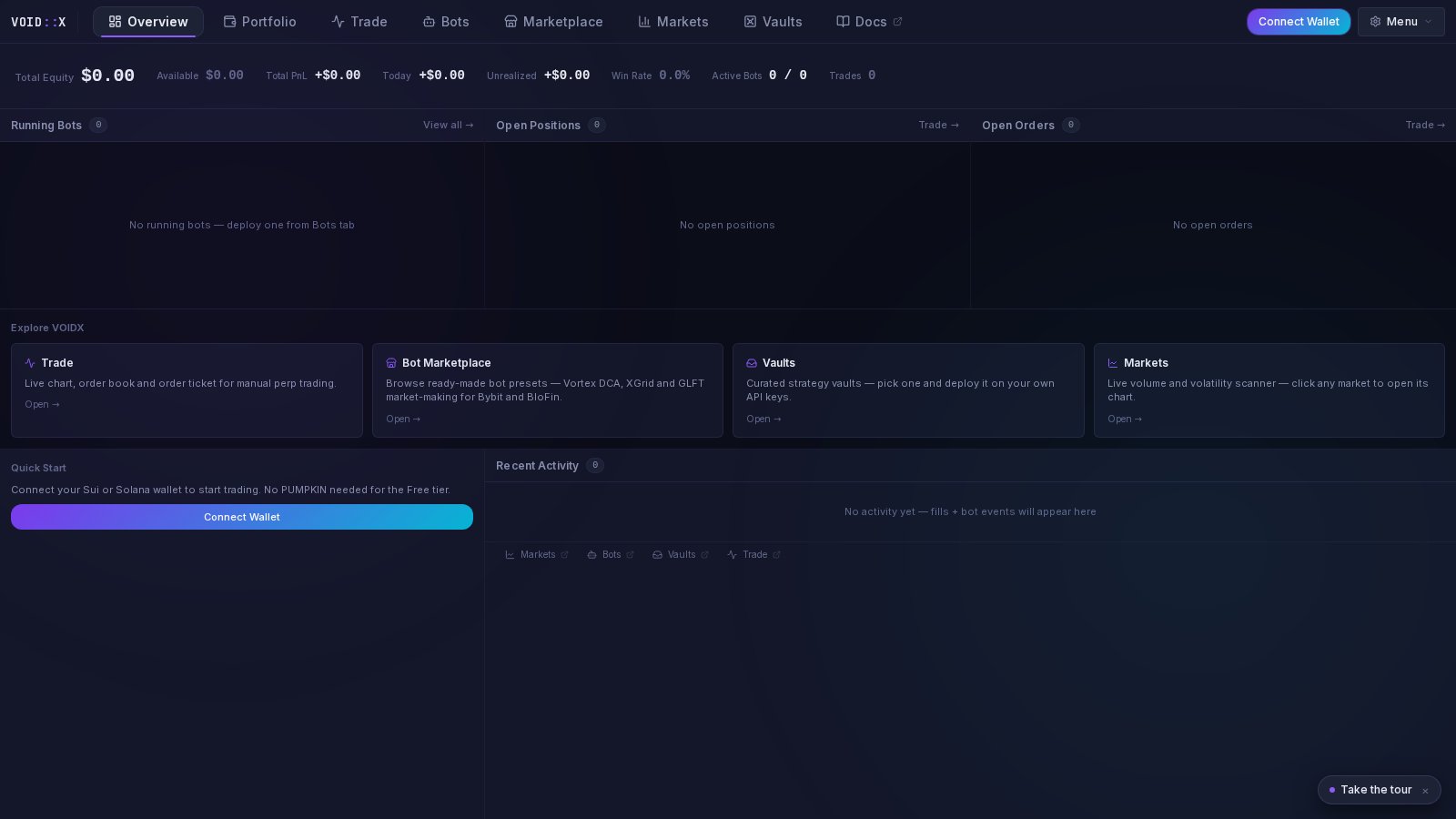 Click **Launch App** to open the terminal. You can browse everything — the Marketplace, Markets, strategy details — **without connecting a wallet**. Connecting is only needed when you want to act.
From zero to your first deployed bot, step by step
41 preset bots across 4 strategy families — browse, compare, deploy
How Vortex DCA, XGrid, GLFT MM, and Long-Only DCA work
Trade on-chain on Sui via DeepBook — no API keys needed
***
## The Terminal
The app is organized into tabs:
| Tab | What it's for |
| --------------- | --------------------------------------------------------------------------------- |
| **Overview** | Quick start, market snapshot, and your account at a glance |
| **Portfolio** | Equity curve (1D/7D/30D/90D), per-exchange allocation, bot performance, positions |
| **Trade** | Manual trading on your connected exchanges |
| **Bots** | Manage your running bots — status, logs, start/stop |
| **Marketplace** | Browse and deploy preset bots |
| **Markets** | Market data and discovery |
| **Vaults** | Pre-configured one-click strategies |
| **Docs** | Opens this documentation |
## Bot Marketplace
The Marketplace is where most users start. It shows **41 preset cards across 4 strategy families** — Vortex DCA, XGrid, GLFT MM, and Long-Only DCA — each with a plain-English description and stat tiles read directly from the preset's real configuration. No invented performance figures.
Click **Launch App** to open the terminal. You can browse everything — the Marketplace, Markets, strategy details — **without connecting a wallet**. Connecting is only needed when you want to act.
From zero to your first deployed bot, step by step
41 preset bots across 4 strategy families — browse, compare, deploy
How Vortex DCA, XGrid, GLFT MM, and Long-Only DCA work
Trade on-chain on Sui via DeepBook — no API keys needed
***
## The Terminal
The app is organized into tabs:
| Tab | What it's for |
| --------------- | --------------------------------------------------------------------------------- |
| **Overview** | Quick start, market snapshot, and your account at a glance |
| **Portfolio** | Equity curve (1D/7D/30D/90D), per-exchange allocation, bot performance, positions |
| **Trade** | Manual trading on your connected exchanges |
| **Bots** | Manage your running bots — status, logs, start/stop |
| **Marketplace** | Browse and deploy preset bots |
| **Markets** | Market data and discovery |
| **Vaults** | Pre-configured one-click strategies |
| **Docs** | Opens this documentation |
## Bot Marketplace
The Marketplace is where most users start. It shows **41 preset cards across 4 strategy families** — Vortex DCA, XGrid, GLFT MM, and Long-Only DCA — each with a plain-English description and stat tiles read directly from the preset's real configuration. No invented performance figures.
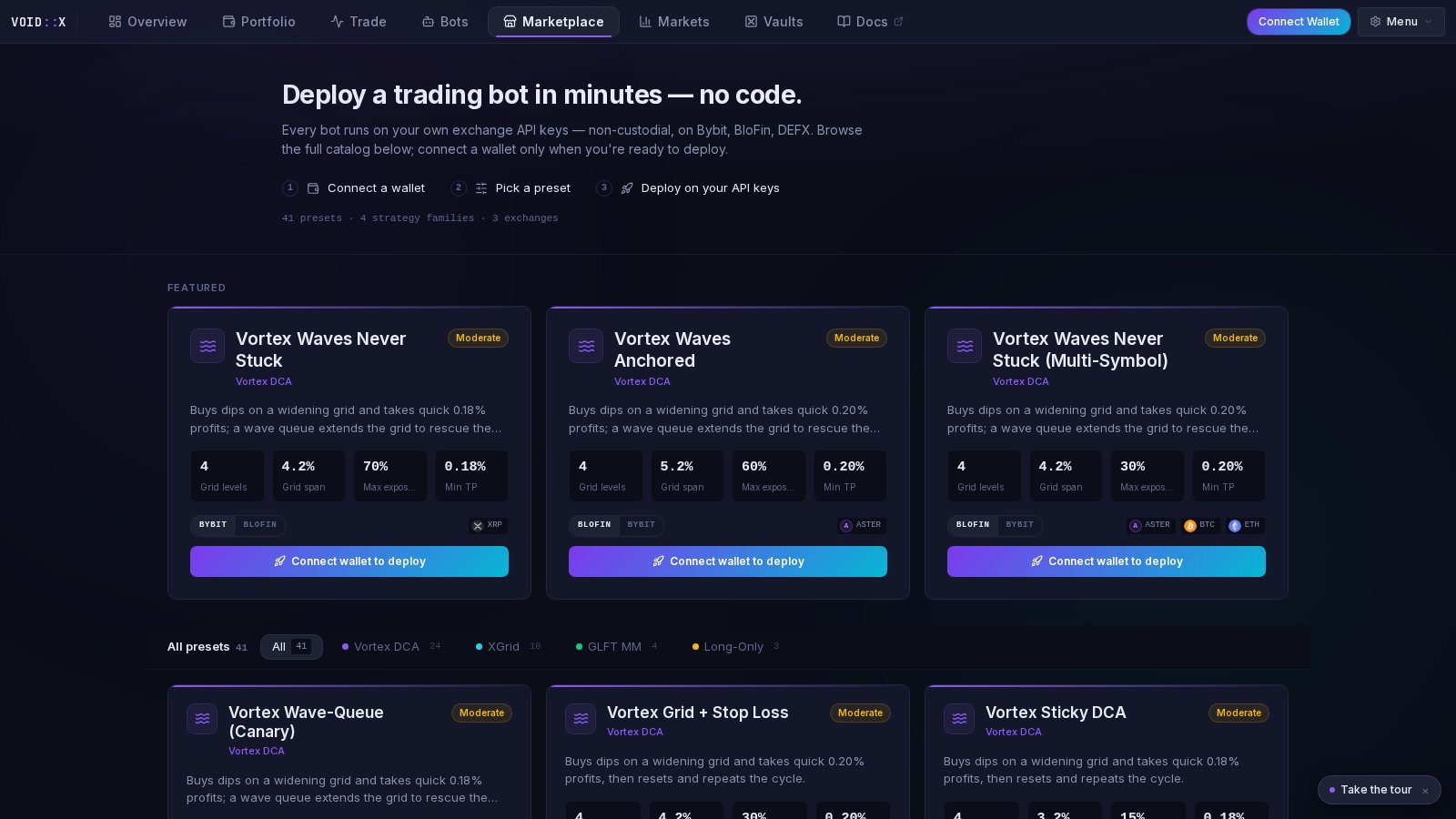 Click a card to open its detail view, pick your exchange variant (Bybit, BloFin, or DEFX), and hit **Deploy** — the deploy wizard opens prefilled with that preset's settings.
## How It Works
Open [voidx.trade](https://voidx.trade) and explore. No wallet, no signup — guests see everything.
Connect a Sui, Solana, or EVM wallet. **No PUMPKIN tokens needed for the Free tier.**
Add API keys for your exchange (trade permission only — never enable withdrawals). Keys are stored encrypted.
Pick a preset, deploy it, and monitor it in the Bots and Portfolio tabs. Each bot runs as its own process and trades through your keys.
**Non-custodial by design.** Bots trade through your exchange API keys. Your funds never leave your exchange account, and VOIDX cannot withdraw them.
## Free and Pro Tiers
* **Free** — connect a wallet and start: 1 bot, 1 symbol, 1 exchange. No PUMPKIN required.
* **Pro** — 5 bots, 10 symbols, 5 exchanges. A 14-day Pro trial is available (no card required). Upgrading via PUMPKIN burn is coming soon.
See the [PUMPKIN Token page](/pumpkin-token) for details.
## Supported Exchanges
* **BloFin** - Primary CEX with advanced features
* **Bybit** - Popular derivatives exchange
* **HTX** (Huobi) - Global exchange platform
* **WEEX** - Low-fee trading
* **DEFX** - Decentralized derivatives
## Affiliates
Sign up with our partner exchanges using these referral links for exclusive benefits:
5% cashback on trading fees
Leading derivatives platform
Low-fee perpetual trading
## Need Help?
Common issues and solutions
Get support from the community
***
**Trading involves risk.** Start with small amounts and conservative settings while learning the system. Never invest more than you can afford to lose.
Click a card to open its detail view, pick your exchange variant (Bybit, BloFin, or DEFX), and hit **Deploy** — the deploy wizard opens prefilled with that preset's settings.
## How It Works
Open [voidx.trade](https://voidx.trade) and explore. No wallet, no signup — guests see everything.
Connect a Sui, Solana, or EVM wallet. **No PUMPKIN tokens needed for the Free tier.**
Add API keys for your exchange (trade permission only — never enable withdrawals). Keys are stored encrypted.
Pick a preset, deploy it, and monitor it in the Bots and Portfolio tabs. Each bot runs as its own process and trades through your keys.
**Non-custodial by design.** Bots trade through your exchange API keys. Your funds never leave your exchange account, and VOIDX cannot withdraw them.
## Free and Pro Tiers
* **Free** — connect a wallet and start: 1 bot, 1 symbol, 1 exchange. No PUMPKIN required.
* **Pro** — 5 bots, 10 symbols, 5 exchanges. A 14-day Pro trial is available (no card required). Upgrading via PUMPKIN burn is coming soon.
See the [PUMPKIN Token page](/pumpkin-token) for details.
## Supported Exchanges
* **BloFin** - Primary CEX with advanced features
* **Bybit** - Popular derivatives exchange
* **HTX** (Huobi) - Global exchange platform
* **WEEX** - Low-fee trading
* **DEFX** - Decentralized derivatives
## Affiliates
Sign up with our partner exchanges using these referral links for exclusive benefits:
5% cashback on trading fees
Leading derivatives platform
Low-fee perpetual trading
## Need Help?
Common issues and solutions
Get support from the community
***
**Trading involves risk.** Start with small amounts and conservative settings while learning the system. Never invest more than you can afford to lose.