> ## Documentation Index
> Fetch the complete documentation index at: https://docs.quantumvoid.org/llms.txt
> Use this file to discover all available pages before exploring further.
# Quickstart
> From browsing to your first deployed bot
# Your First Bot on VOIDX
This guide walks you through the current VOIDX flow: **browse → connect → add API keys → deploy from the Marketplace**. By the end, you'll have a bot running on your own exchange account.
**What you'll need:**
* A wallet — Sui, Solana, or EVM (MetaMask, Phantom, Sui Wallet, etc.)
* An exchange account — BloFin, Bybit, HTX, WEEX, or DEFX
* Trading capital in your exchange futures wallet (\$500+ recommended)
**You do NOT need PUMPKIN tokens.** The Free tier requires none.
**Security first:** Never share your API keys, wallet private keys, or passwords with anyone. VOIDX will NEVER ask for your private keys, and your API keys should never have withdrawal permission.
***
## Step 1: Browse Without Connecting (0 minutes setup)
Go to [voidx.trade](https://voidx.trade) and click **Launch App**.
You don't need a wallet or an account to look around. As a guest you can:
* Open the **Marketplace** tab and browse all preset bots
* Click any card to see its full detail view — strategy explanation, stat tiles, exchange variants
* Check the **Markets** tab for market data
* Read strategy descriptions before risking anything
Actions (deploying, trading) are gated — buttons will say **"Connect wallet to deploy"** until you connect.
Spend a few minutes in the Marketplace first. Picking a strategy you understand matters more than any setting.
***
## Step 2: Connect Your Wallet (2 minutes)
In the top bar, click **Connect Wallet** and choose your chain: Sui, Solana, or EVM (BSC, Base, Ethereum).
Your wallet extension will prompt you — click Approve.
Sign the message to verify wallet ownership. This is a signature only — no transaction, no gas, nothing leaves your wallet.
**No PUMPKIN needed for the Free tier.** Connecting a wallet gives you Free tier access: 1 bot, 1 symbol, 1 exchange. Pro (5 bots, 10 symbols, 5 exchanges) is available via a 14-day trial. See [PUMPKIN Token](/pumpkin-token).
**What you'll see:** the top bar now shows your wallet address and a tier badge (FREE or PRO). The Overview tab's Quick Start panel switches to prompt you for exchange API keys.
***
## Step 3: Add Exchange API Keys (5 minutes)
### 3.1 Create API Keys on Your Exchange
1. Log in to BloFin
2. Go to **Account** → **API Management**
3. Create new API key with:
* [x] Read
* [x] Trade
* [ ] Withdraw (NEVER enable!)
4. Set a passphrase
5. Copy: API Key, Secret, Password
[Full BloFin Guide →](/exchanges/blofin)
1. Log in to Bybit
2. Go to **Account** → **API**
3. Create new API key with:
* [x] Read
* [x] Trade (Contract)
* [ ] Withdraw (NEVER enable!)
4. Copy: API Key, Secret
[Full Bybit Guide →](/exchanges/bybit)
1. Log in to HTX
2. Go to **Account** → **API Management**
3. Create new key with Trade permission
4. Copy: API Key, Secret
[Full HTX Guide →](/exchanges/htx)
1. Log in to WEEX
2. Go to **Account** → **API Management**
3. Create new key with passphrase
4. Copy: API Key, Secret, Passphrase
[Full WEEX Guide →](/exchanges/weex)
For DEFX (decentralized derivatives), see the [DEFX guide](/exchanges/defx).
### 3.2 Add Keys to VOIDX
On the **Overview** tab, the Quick Start panel shows an **Add Exchange** button once your wallet is connected.
* Select your exchange
* Paste API Key and Secret
* Enter Password/Passphrase (BloFin and WEEX require it; BloFin's broker ID is filled in automatically)
Use **Test** to confirm the keys work before relying on them.
**Want to practice first?** When adding credentials you can toggle **Testnet** to connect to your exchange's paper-trading environment instead of live markets.
**What you'll see:** your exchange appears in your credentials list, and the Portfolio tab starts recording your equity (a snapshot every 5 minutes) so the equity curve fills in over time.
***
## Step 4: Deploy a Bot from the Marketplace (5 minutes)
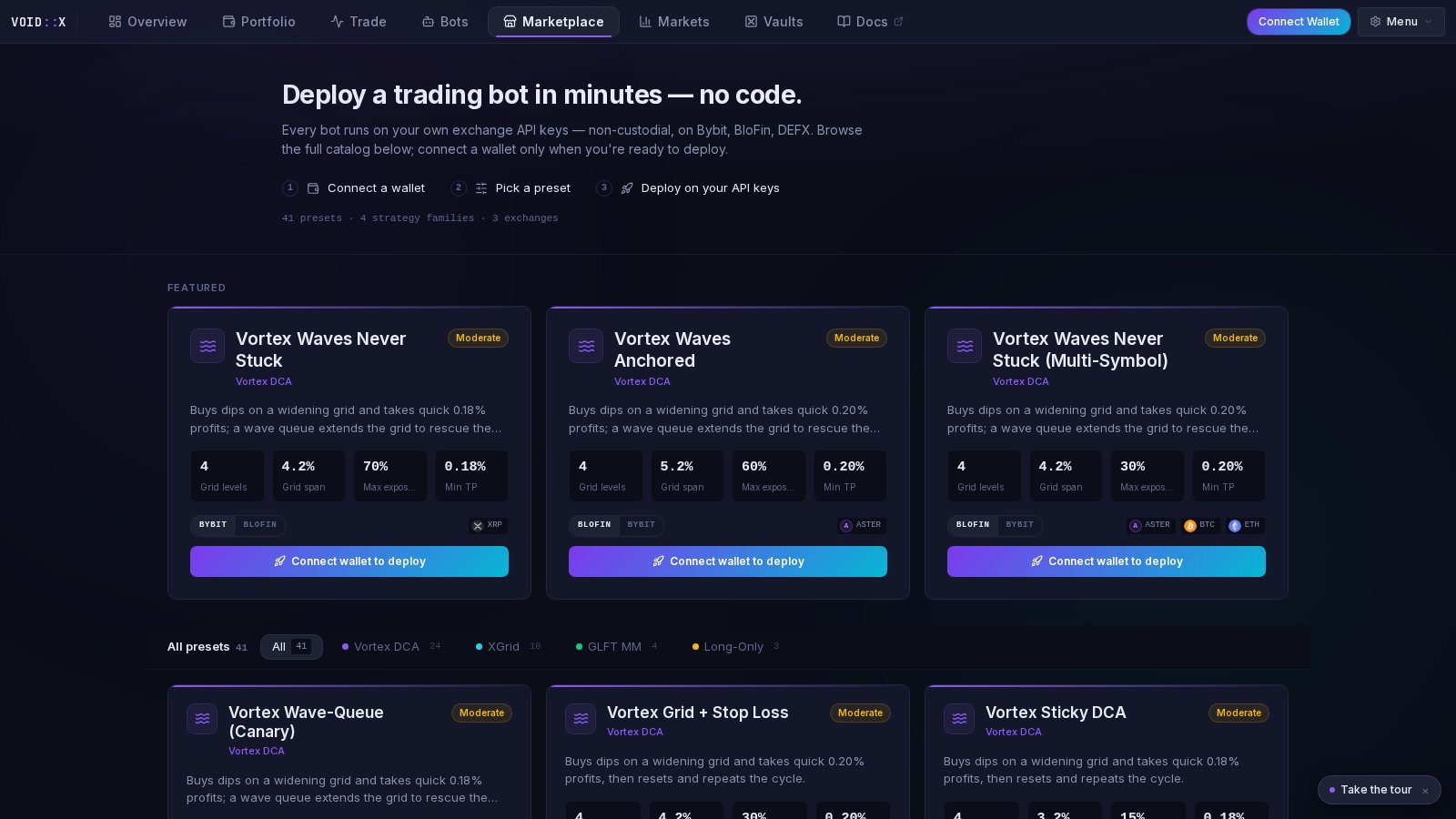 You'll see 41 preset cards across 4 strategy families: **Vortex DCA**, **XGrid**, **GLFT MM**, and **Long-Only DCA**. Filter by family using the chips at the top.
Each card shows a plain-English description, a risk label (Conservative / Moderate / Aggressive), and stat tiles read from the preset's actual configuration. Beginners: start with a **Conservative** preset.
Click the card to see the full breakdown of how the strategy behaves and what each stat means.
If a preset is available on multiple exchanges (Bybit, BloFin, DEFX), toggle to the exchange you added keys for.
The deploy wizard opens **prefilled** with the preset's settings. Review them, pick your symbol, and confirm.
**What you'll see:** your new bot appears in the **Bots** tab with a status indicator. Each bot runs as its own process on VOIDX servers and trades through your API keys.
***
## Step 5: Verify It's Working (5 minutes)
### Check These Indicators
**Status is green** — the bot is running without errors (Bots tab)
**Orders visible** — open orders appear on your exchange and in the terminal
**Logs updating** — the bot's log stream shows activity
**Portfolio filling in** — the equity curve on the Portfolio tab starts recording
### What to Expect
**First few minutes:**
* Bot analyzes market conditions
* Places initial orders
* You'll see orders in the terminal and on your exchange
**First hours:**
* Some orders may fill, depending on market movement
* A position may open and P\&L starts tracking
**First day:**
* Multiple fills are likely in normal conditions
* Positions grow and shrink as the strategy works
***
## What's Next?
Learn how each strategy family works
Adjust parameters for your style
Protect your capital
Trade on-chain on Sui via DeepBook
***
## Common First-Timer Questions
It depends on market conditions. In active markets, you might see fills within hours. In quiet markets, it might take longer.
**Don't expect:** Instant profits
**Do expect:** Activity within 24 hours in normal conditions
This is normal! DCA-style strategies are designed to average into positions and recover.
* Small unrealized losses are expected
* The system has recovery mechanisms
* Only worry at large drawdowns
**First week:** Check daily to understand behavior
**After learning:** Weekly checks are usually fine
**Exception:** Highly volatile markets — check more often
Consider stopping when:
* You want to take profits
* Market conditions are extreme
* You don't understand what's happening
* You're approaching loss limits
Don't stop just because of small fluctuations — that's normal!
***
## Need Help?
Common questions answered
Get help from the community
You'll see 41 preset cards across 4 strategy families: **Vortex DCA**, **XGrid**, **GLFT MM**, and **Long-Only DCA**. Filter by family using the chips at the top.
Each card shows a plain-English description, a risk label (Conservative / Moderate / Aggressive), and stat tiles read from the preset's actual configuration. Beginners: start with a **Conservative** preset.
Click the card to see the full breakdown of how the strategy behaves and what each stat means.
If a preset is available on multiple exchanges (Bybit, BloFin, DEFX), toggle to the exchange you added keys for.
The deploy wizard opens **prefilled** with the preset's settings. Review them, pick your symbol, and confirm.
**What you'll see:** your new bot appears in the **Bots** tab with a status indicator. Each bot runs as its own process on VOIDX servers and trades through your API keys.
***
## Step 5: Verify It's Working (5 minutes)
### Check These Indicators
**Status is green** — the bot is running without errors (Bots tab)
**Orders visible** — open orders appear on your exchange and in the terminal
**Logs updating** — the bot's log stream shows activity
**Portfolio filling in** — the equity curve on the Portfolio tab starts recording
### What to Expect
**First few minutes:**
* Bot analyzes market conditions
* Places initial orders
* You'll see orders in the terminal and on your exchange
**First hours:**
* Some orders may fill, depending on market movement
* A position may open and P\&L starts tracking
**First day:**
* Multiple fills are likely in normal conditions
* Positions grow and shrink as the strategy works
***
## What's Next?
Learn how each strategy family works
Adjust parameters for your style
Protect your capital
Trade on-chain on Sui via DeepBook
***
## Common First-Timer Questions
It depends on market conditions. In active markets, you might see fills within hours. In quiet markets, it might take longer.
**Don't expect:** Instant profits
**Do expect:** Activity within 24 hours in normal conditions
This is normal! DCA-style strategies are designed to average into positions and recover.
* Small unrealized losses are expected
* The system has recovery mechanisms
* Only worry at large drawdowns
**First week:** Check daily to understand behavior
**After learning:** Weekly checks are usually fine
**Exception:** Highly volatile markets — check more often
Consider stopping when:
* You want to take profits
* Market conditions are extreme
* You don't understand what's happening
* You're approaching loss limits
Don't stop just because of small fluctuations — that's normal!
***
## Need Help?
Common questions answered
Get help from the community