

Terminal Overview
The VOIDX Terminal is the single interface for everything on the platform: manual trading, bot deployment, the preset marketplace, vaults, market scanning, and portfolio tracking. It uses the dark VOIDX Dusk theme throughout and is designed so you can find your account value, your bots, and your positions at a glance. You can browse the entire terminal as a guest — every tab is open. Connecting a wallet is only required when you want to act: deploy a bot, place an order, or save exchange API keys.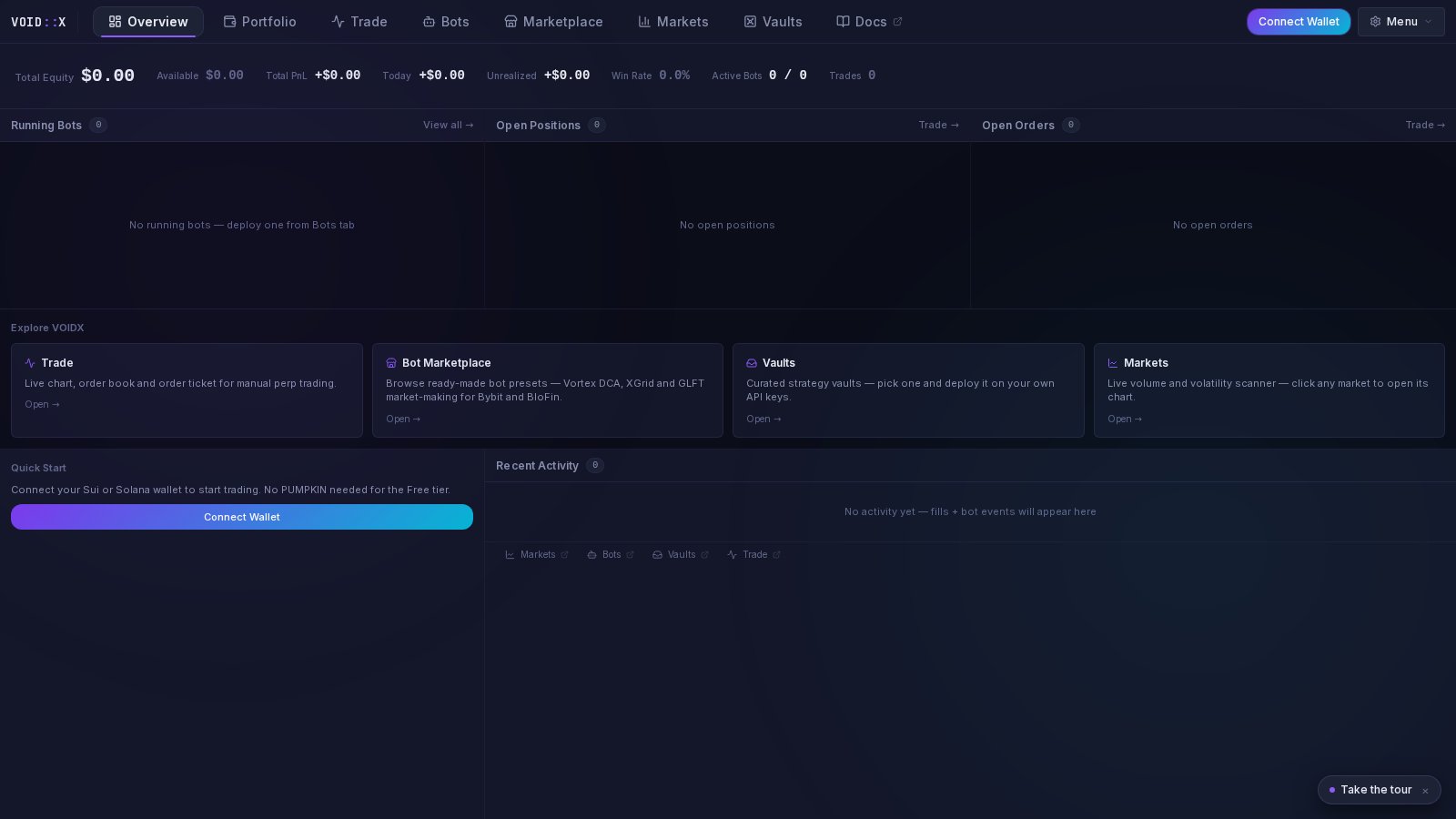
The Tabs
The terminal is organized into eight top-level tabs:The Overview Tab
The Overview tab is the terminal’s home screen. It is built from three bands.Band 1: Equity Strip
A single row across the top anchored by Total Equity — rendered large so your account value is always the first thing you see. Next to it:- Available — balance available for trading
- Total PnL — cumulative profit and loss
- Today — last 24-hour performance
- Unrealized — open position profit and loss
- Win Rate — percentage of profitable trades
- Active Bots — running vs. total (e.g.
3 / 5) - Trades — total trade count
Band 2: Live Columns
Three side-by-side columns give you the live state of your account:- Running Bots — each running bot with its exchange, primary symbol, and live PnL. Click a row to jump to that symbol’s chart in the Trade tab. “View all” jumps to the Bots tab.
- Open Positions — side (LONG/SHORT), symbol, size @ entry price, and unrealized PnL. Click a row to open it in the Trade tab.
- Open Orders — side (BUY/SELL), symbol, and amount @ price for every resting order.
Explore Tiles
Below the columns, four clickable tiles describe and link to the main product areas: Trade, Bot Marketplace, Vaults, and Markets. These appear for guests and logged-in users alike — they are the fastest way to jump around the terminal.Band 3: Quick Start and Recent Activity
- Quick Start — shown until you are fully set up. Guests get a Connect Wallet button; connected users without exchange keys get Add Exchange and Deploy Bot buttons. Once you have saved credentials, the card disappears and hands the space to activity.
- Recent Activity — a live feed of fills and bot events with color-coded severity dots (green success, amber warning, red error) and timestamps.
- Jump links — a slim toolbar at the bottom linking to Markets, Bots, Vaults, and Trade.
The Markets Tab
The Markets tab is a live volume and volatility scanner for Bybit perpetuals, refreshed every 60 seconds.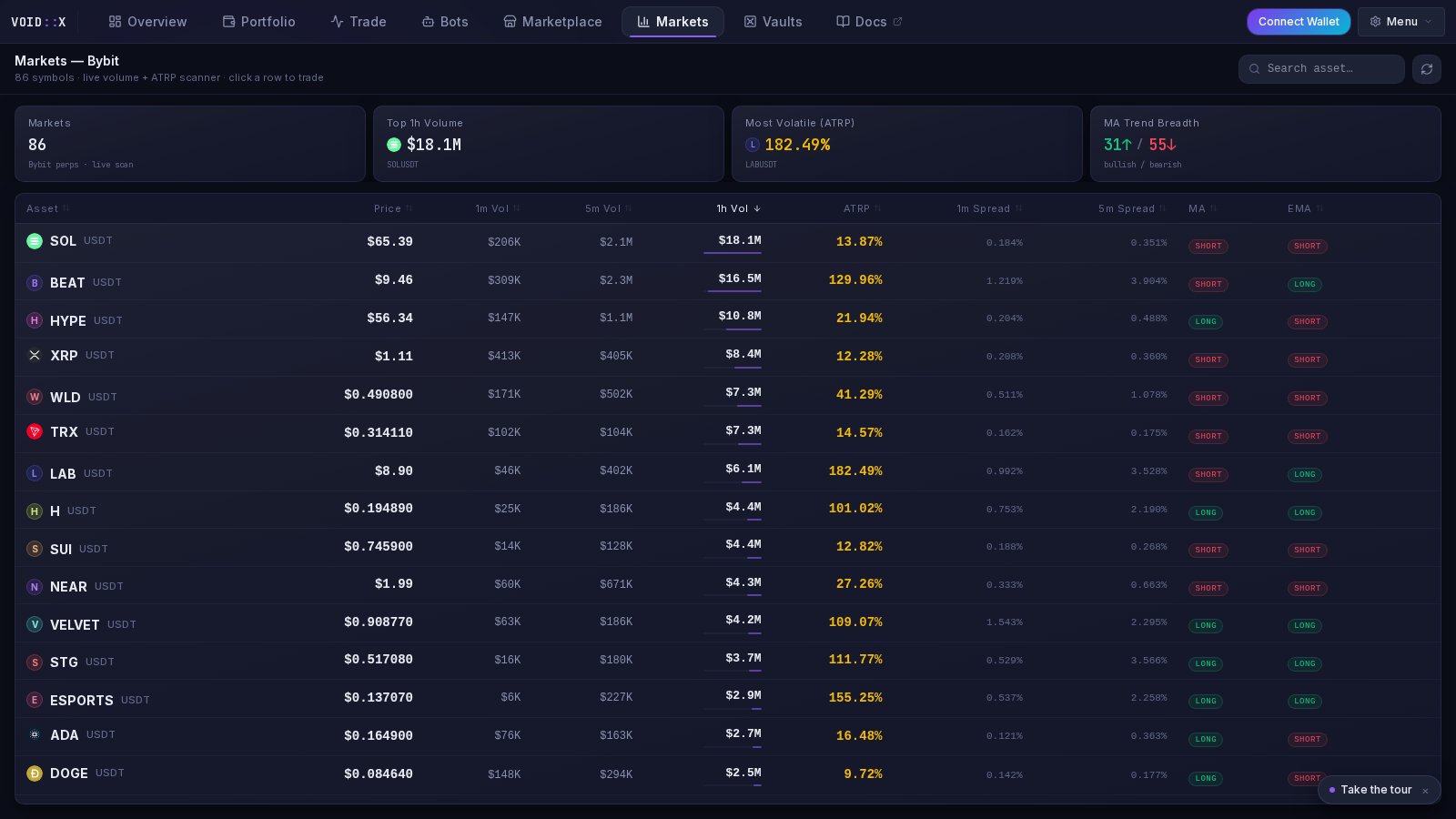
- Markets — number of symbols in the scan
- Top 1h Volume — the highest-volume market right now
- Most Volatile (ATRP) — the market with the highest Average True Range percentage
- MA Trend Breadth — how many markets are trending bullish vs. bearish
A search box filters by asset name. Click any row to open that market in the Trade tab with the symbol and exchange pre-selected.
Wallet Connection and Exchange Keys
VOIDX is non-custodial. Two separate connections power the terminal:- Wallet — your identity on the platform. Connecting and signing a message authenticates you; no transaction is made and no funds move.
- Exchange API keys — saved encrypted, per exchange, via the Add Exchange flow. Bots and manual orders are placed through these keys. Funds stay on your exchange account.
Where to Go Next
- Marketplace — deploy your first bot from a preset
- Vaults — the one-click curated route
- Trading Console — manual trading in the Trade tab
- Portfolio — track your equity over time
- Bot Management — manage running bots