

Bot Marketplace
The Marketplace is the complete browser for canonical VOIDX bot presets. The current registry contains 126 active underlying presets, grouped into 80 cards across 9 strategy families. Exchange variants are grouped where appropriate so one card can represent multiple venues without hiding configuration differences. Every deployment remains non-custodial: the bot trades through your exchange API credentials, and funds stay in your exchange account.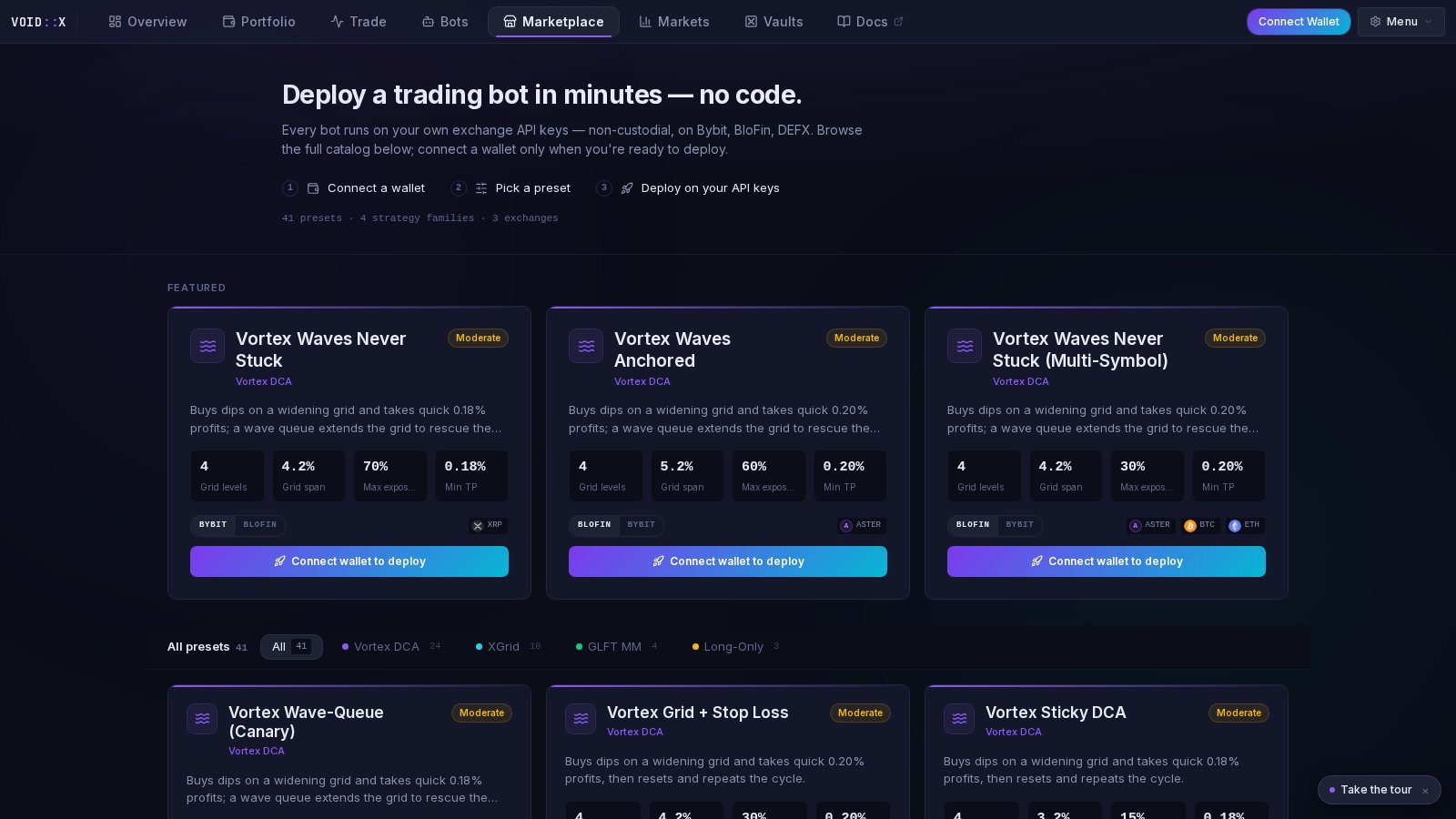
Guests can browse details and compare presets. Deployment requires wallet authentication and saved read/trade-only credentials for the selected exchange.
Current Strategy Families
Use the strategy filter to narrow the catalog. Current venue variants span BloFin, Bybit, Aster, TxFlow, and DEFX, but availability differs by family.
Latest Shelf
The Latest shelf is a manually curated release lineup, not a list generated from staleNEW tags. It currently highlights modern profiles such as Tyler’s Liquidation Hunter, Cascade Maker exits, Peaks/Troughs Lambo, TBLTBS LINEAR, EMA Singularity, RetShock, Hydra, Vortex Anchored V2, and Orderbook Walls V2.
Latest means recently promoted—not validated profitability or reduced risk.
What’s on a Card
Each card includes:- preset and strategy name
- exchange variant controls when applicable
- author-assigned risk tier
- canonical technical description
- headline settings derived from the configuration
- default or dynamic symbol behavior
- details and deploy actions
Tyler’s Liquidation Hunter
Tyler’s Liquidation Hunter is a dedicated featured BloFin preset for experienced users who want the raw Cascade maker lifecycle in one obvious selection.- 6 directional seats
- 20/20 long and short wallet-exposure ratios
- 50x requested leverage with 20x minimum
- 3 same-side liquidation prints in 10 seconds and $1,000 combined notional
- exact candle priority for a maximum of 6 minutes before seat mutation
- one durable post-only maker starter before DCA
- 6 long / 5 short Peaks/Troughs levels
- 50% fixed tranche at +0.22% gross
- native stop-market trailing for the remainder
BLC_ owner and durable namespace for controlled replacement. It is marked unvalidated live-executable opt-in and has no replay-performance proof. See TBLTBS and Liquidation Hunter.
Deploying a Preset
1
Connect a wallet
Your wallet authenticates your VOIDX account. Signing does not move trading funds.
2
Save exchange credentials
Add the intended exchange using credentials with Read and Trade only.
3
Inspect the preset
Confirm the venue, exposure unit, leverage, concurrency, symbols, TP mode, stop behavior, and replacement requirements.
4
Deploy
The standard wizard receives a fresh copy of the canonical configuration. Optional changes become your saved custom policy.
5
Verify runtime health
Confirm the bot has a current heartbeat and reconcile dashboard state with exchange positions and orders.
Custom Strategies
Marketplace also provides a named JSON custom-strategy editor. It validates configuration through the backend before saving. Credentials pasted into JSON are not accepted as a strategy source; use the encrypted exchange credential flow instead. A custom configuration is not automatically associated with a canonical preset unless it carries exact source identity.Preset Source and Updates
New canonical deployments store stable preset metadata: ID, name, exchange, and content revision. This lets VOIDX detect when the source preset changes without pretending that local customization is outdated. When Update from preset appears, replacement requires explicit confirmation. It overwrites custom values with a new canonical copy. Updating a saved bot does not restart a running process.Switching and Existing Positions
Compatible TBLTBS profiles use durable, generation-fenced handoff. Existing exposure is adopted only with exact provenance and authoritative exchange truth; unresolved inherited campaigns remain protected no-growth caretakers.Choosing Safely
- Check exposure and position ceilings before TP.
- Read leverage and seat count together.
- Understand whether the preset averages, hedges, stops, or simply holds.
- Confirm the exit is fixed, trailing, partial-plus-trailing, or recovery-based.
- Start smaller than your maximum risk tolerance.
- Treat descriptions as configuration documentation, not return forecasts.
Frequently Asked Questions
Where do Marketplace values come from?
Where do Marketplace values come from?
From the canonical frontend preset registry used by the deploy wizard. Values describe the configuration that will be saved.
What is an exchange variant?
What is an exchange variant?
It is a related preset tuned for a different venue. Marketplace may group variants on one card, but selecting another venue changes the actual configuration.
Can I edit a preset?
Can I edit a preset?
Yes. Changes in the deploy wizard become your custom saved configuration. Later canonical updates never overwrite those values without explicit confirmation.
Does changing a saved configuration update a running bot?
Does changing a saved configuration update a running bot?
No. Runtime policy is loaded at process startup. A running bot must be controlled separately.
Preset Selection Guide
Compare risk, units, and update behavior
TBLTBS
Liquidation Hunter and safe campaign switching
Vaults
Browse the one-click vault catalog
Bot Management
Control deployed instances